Getting Started
Installation
For now, Virdant only works on Linux. You can install it by cloning the repository and running make install:
$ git clone https://github.com/virdant-lang/virdant
$ cd virdant
$ make install
This will build Virdant from source and then copy the binaries to $HOME/.local/virdant/bin. Make sure that this directory is on your $PATH.
Blinky
Tradition dictates that the first program that is written in any programming language should be Hello, World! In hardware projects, the equivalent of Hello, World! is to get an LED to blink on and off.
Create a new Virdant project by running:
$ vir new blink
$ cd blink
This will create a new project in a subdirectory named blink. If we look at the src/top.vir file, we will see our blinking LED design:
//! This package defines a module `Blink`, which blinks an LED.

import strobe

//> `Blink` will toggle the `led` every few million cycles.
mod Blink {
    incoming clock : Clock
    incoming reset : Reset

    //> The LED output, toggled each time the strobe fires.
    outgoing reg led : Bit on clock {
        when {
            case strobe_timer.pulse {
                it <= !it
            }
        }
    }

    //> A strobe that fires every 12 million cycles.
    mod strobe_timer of strobe::Strobe {
        it.clock  := clock
        it.reset  := reset
        it.period := 12_000_000
    }
}
Compiling to Verilog
We can compile this design to Verilog with the following:
$ vir build
The result will be a new file called build/top.sv.
To simulate the design, you need a Verilog testbench. Here is one which will run the design for 100 cycles:
module Testbench();
    \top::Top top(
        .clock(clock)
    );

    reg clock = 1'b0;
    always #(5) clock = !clock;

    initial begin
        $dumpfile("build/out.vcd");
        $dumpvars(0, top);

        repeat(32) @(posedge clock);

        $finish;
    end
endmodule
If you have Icarus Verilog installed, you can compile a simulator and run it with these commands:
$ iverilog testbench.sv build/top.sv -o build/blink
$ ./build/blink
VCD info: dumpfile build/out.vcd opened for output.
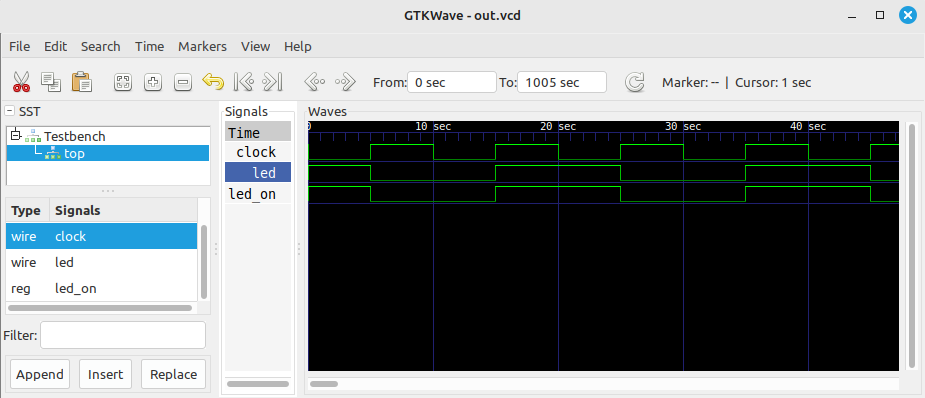
Finally, using a waveform viewer such as GTK Wave, you can view the waveform: